Configuration of a Samba Server on Linux - Network and Systems Administration
A hands-on configuration of a Samba Server on Linux, focuses on setting up file and printer sharing using the SMB protocol.
Project Overview
This project involved designing, configuring, and testing a Samba server on a Linux virtual machine (Ubuntu 24.04) to enable seamless file and printer sharing in a diverse network environment (Linux and Windows clients). Samba is an open-source implementation of the SMB/CIFS protocol, allowing Linux systems to interoperate with Microsoft Windows for resource sharing. The main objective was to implement three different types of file shares with varying levels of security and access control, simulating real-world enterprise file-sharing scenarios.
Project Objectives
- Provide reliable file and printer access to different OS clients.
- Harden shared resources with appropriate permissions and users.
- Document repeatable deployment steps for lab and production use.
Key Activities
- Installed and configured Samba on Ubuntu inside VirtualBox.
- Created user-specific and public shares with correct UNIX permissions.
- Configured printer sharing and verified cross-platform printing.
- Tested connectivity from Windows clients and resolved SMB negotiation issues.
Technical Notes
- Samba configuration: updated
/etc/samba/smb.confwith named shares,valid users, and appropriatecreate mask/directory masksettings. - User management: synchronized Linux users with Samba (
smbpasswd), assigned share-level permissions, and tested with sample accounts. - Security: limited guest access, used strong file permissions and group-based access control to prevent unauthorized reads/writes.
Lessons Learned
- Cross-OS filename and permission semantics require careful mapping when exposing UNIX files to Windows clients.
- Printer sharing often requires driver and CUPS (Common UNIX Printing System) compatibility checks on the server and client sides.
Results
The lab demonstrates a working Samba server that provides both file and printer services across platforms. Configuration artifacts and notes support re-deployment in other environments. The lab demonstrates a working Samba server that provides both file and printer services across platforms. Configuration artifacts and notes support re-deployment in other environments.
Outcomes
- Implemented the SMB protocol for cross-platform file sharing.
- Implemented three access models: public (anonymous), private (authenticated), and restricted (group + IP-based control).
- Gained proficiency with Samba configuration (
/etc/samba/smb.conf), UNIX permissions (chmod,chown), and Samba user management (smbpasswd). - Verified interoperability between Linux hosts and the Samba server (VM).
Technical Environment
- Hypervisor: Oracle VirtualBox
- Server: Ubuntu 24.04 LTS (VM: 1 vCPU, 1 GB RAM)
- Host OS: Linux Ubuntu
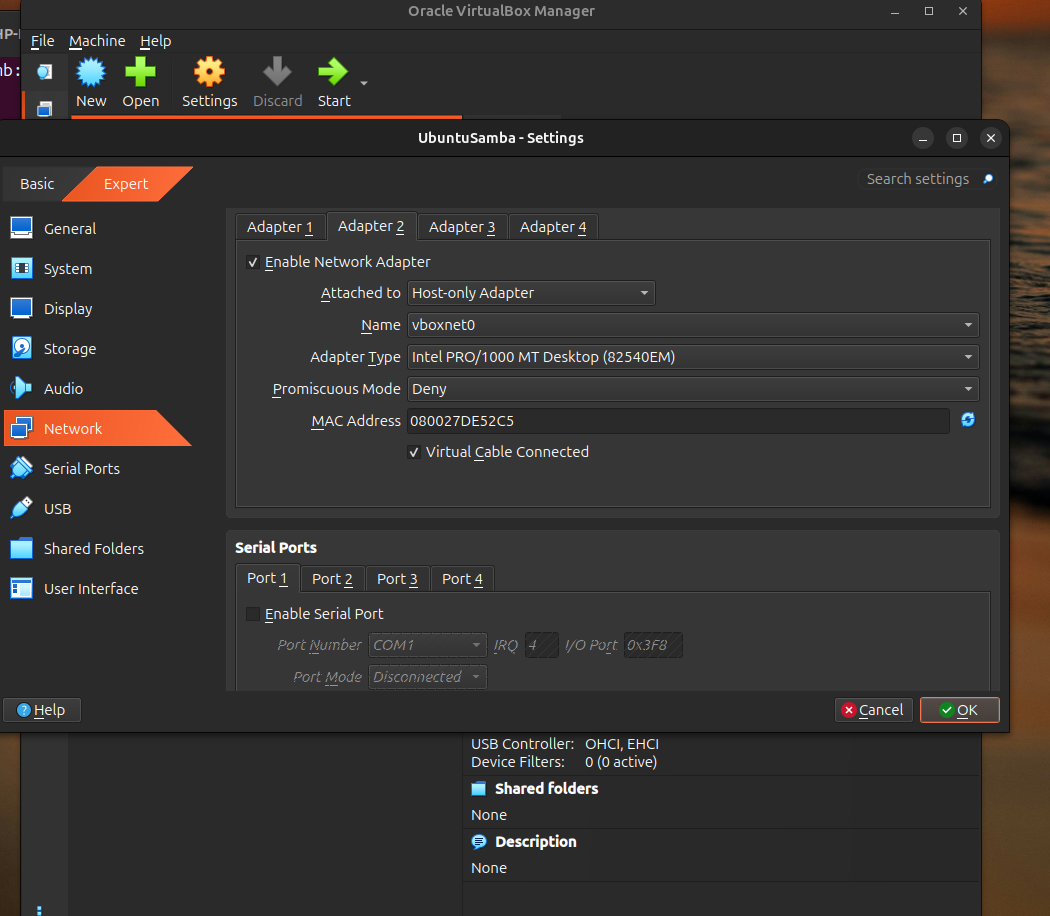
- Network: Adapter 1 = NAT (internet), Adapter 2 = Host-Only (private LAN 192.168.56.0/24)
Project Process & Key Steps
Virtual Machine Setup
- Created and configured an Ubuntu VM with Host-Only networking to simulate an isolated LAN for testing.
- Installed a minimal Ubuntu Server image to conserve resources.
Samba Installation & Basic Configuration
- Update packages and install Samba:
sudo apt update && sudo apt upgrade -y
sudo apt install -y samba
- Edit
/etc/samba/smb.confwith global parameters (e.g.,workgroup,security = user,map to guest = Bad User). Verify withtestparm.
Creation of Share Types
Below are the three share models implemented and tested:
- Public Share (open access)
- Directory:
/srv/samba/public - Permissions:
sudo chown nobody:nogroup /srv/samba/public && sudo chmod 777 /srv/samba/public - Samba config:
guest ok = yes,writable = yes,force user = nobody
- Directory:
- Private Share (user-authenticated)
- Directory:
/srv/samba/private - Create Samba user:
sudo smbpasswd -a sambauser - Samba config:
valid users = sambauser,writable = yes
- Directory:
- Restricted Share (group + IP restrictions)
- Group: create an admin group (e.g.,
sudo groupadd admin) and add users. - Directory:
/srv/samba/restrictedwithsudo chown root:admin /srv/samba/restricted && sudo chmod 2770 /srv/samba/restricted(setgid). - Samba config:
valid users = @admin,hosts allow = 192.168.56.1,hosts deny = ALL,browsable = no.
- Group: create an admin group (e.g.,
Permissions & Security
- Used
create maskanddirectory maskoptions to enforce file/directory permissions. - Implemented
hosts allowandhosts denyfor IP-level access control.
Testing & Validation
- From the host, tested mounts and access:
- File manager:
smb://192.168.56.101/public - Command line:
smbclient -L //192.168.56.101 -U sambauser
- File manager:
- Verified operations: list, put, get, mkdir, and deletion where permitted.
- Used
testparmand Samba logs (/var/log/samba/) to troubleshoot and verify the configuration.
Skills Demonstrated
- Linux server administration (Ubuntu)
- Samba configuration and troubleshooting
- VirtualBox networking and host-only LAN simulation
- User/group and permission management (
chmod,chown,smbpasswd) - SMB/CIFS protocol understanding and cross-platform interoperability
Challenges & Solutions
- Overcame common Samba issues (protocol negotiation, hosts allow restrictions, permission problems).
- Optimized VM performance with low resources.
- Ensured compatibility between Linux host (client) and Linux VM (server).
Conclusion
This project strengthened practical skills in network file sharing, Linux administration, and cross-platform interoperability—key competencies for systems and network administration roles.